
AI Image Generation for Content Creators: A Beginner's Guide
AI image generation has gone from a novelty to a content creation tool in under two years. For social media creators, it solves a specific problem: getting unique, high-quality lifestyle images without a photographer, a studio, or access to supercars and penthouses. Here is how it works and how to use it for your content.
What Is AI Image Generation?
At its core, AI image generation is text-to-image technology. You write a description (called a "prompt"), and the AI produces an image that matches it. The technology uses neural networks trained on billions of images to understand relationships between words and visual concepts.
Write "a luxury watch on a marble countertop, golden hour lighting, shallow depth of field" and the AI generates exactly that. The result is a completely new image that has never existed before.
Why Content Creators Should Care
For lifestyle and luxury content specifically, AI generation changes the economics of content creation:
- Uniqueness. Every image is one-of-one. No other account has your exact content.
- Speed. Generate a usable image in 10 to 30 seconds instead of spending 20 minutes searching Pinterest.
- Control. Want a specific car in a specific location with specific lighting? Describe it. No more settling for "close enough."
- Volume. Generate as many images as you need. No more rationing a 50-image larp pack across three weeks.
- No copyright risk. You generated it. You own the output.
How AI Image Generation Works (Simply)
You do not need to understand the math, but understanding the basics helps you get better results:
- You write a prompt describing what you want: subject, setting, lighting, mood, style.
- The AI interprets your prompt by mapping your words to visual concepts it learned during training.
- It generates the image starting from random noise and gradually refining it to match your description, step by step.
- You review the result and either use it, adjust your prompt, or regenerate.
The quality of your output depends almost entirely on the quality of your input: the prompt.
Writing Effective Prompts
This is the skill that separates average AI content from photorealistic results. Here are the principles:
Be Specific About the Subject
Bad: "a nice car"
Good: "a matte-black Porsche 911 GT3 RS, front three-quarter angle, parked on wet asphalt"
Describe the Setting
Bad: "in a garage"
Good: "in an underground parking garage, concrete pillars, dim fluorescent lighting, puddles reflecting on the floor"
Specify Lighting and Mood
Bad: "good lighting"
Good: "dramatic side lighting, deep shadows, warm amber accent lights, moody atmosphere"
Include Technical Camera Details
Adding photography terms improves realism dramatically:
- "shot on Canon EOS R5, 85mm f/1.4"
- "shallow depth of field, bokeh background"
- "wide angle lens, low perspective"
- "film grain, Kodak Portra 400 color palette"
Full Example Prompt
"A Rolex Submariner on a man's wrist resting on the edge of a yacht railing, Mediterranean Sea in the background, golden hour sunlight, shallow depth of field, shot on Sony A7R IV 50mm f/1.2, warm color grade, photorealistic"
Common Pitfalls
Even with good prompts, there are recurring issues to watch for:
The "AI Look"
Overly smooth surfaces, impossible reflections, and an uncanny perfection that screams "generated." Combat this by adding imperfections to your prompt: "slight motion blur," "natural skin texture," "dust particles in the air."
Hands and Fingers
AI has historically struggled with human hands and fingers. If your prompt includes hands, specify "anatomically correct hands, five fingers" and be prepared to regenerate a few times.
Text and Logos
AI cannot reliably generate readable text or recognizable brand logos. If you need a watch dial to say "Rolex," you will likely need to edit that in post-production.
Inconsistent Style
Generating multiple images for a cohesive feed is challenging because each generation is independent. The key is keeping your style descriptors consistent across prompts: same lighting, same color grade, same camera specs.
The Gap for Social Media Creators
Here is the honest truth: most AI image tools were built for designers, artists, and developers. They are powerful but complex. The typical workflow looks like this:
- Choose a model (which one? there are dozens)
- Write a prompt (with parameters, negative prompts, and technical syntax)
- Generate and iterate (most first results are not usable)
- Upscale in a separate tool
- Color-correct in a photo editor
- Export at the right resolution for Instagram or TikTok
That is five to six tools and 15 to 20 minutes per final image. For a content creator who needs 5 to 7 posts per week, this adds up fast.
What Purpose-Built Tools Look Like
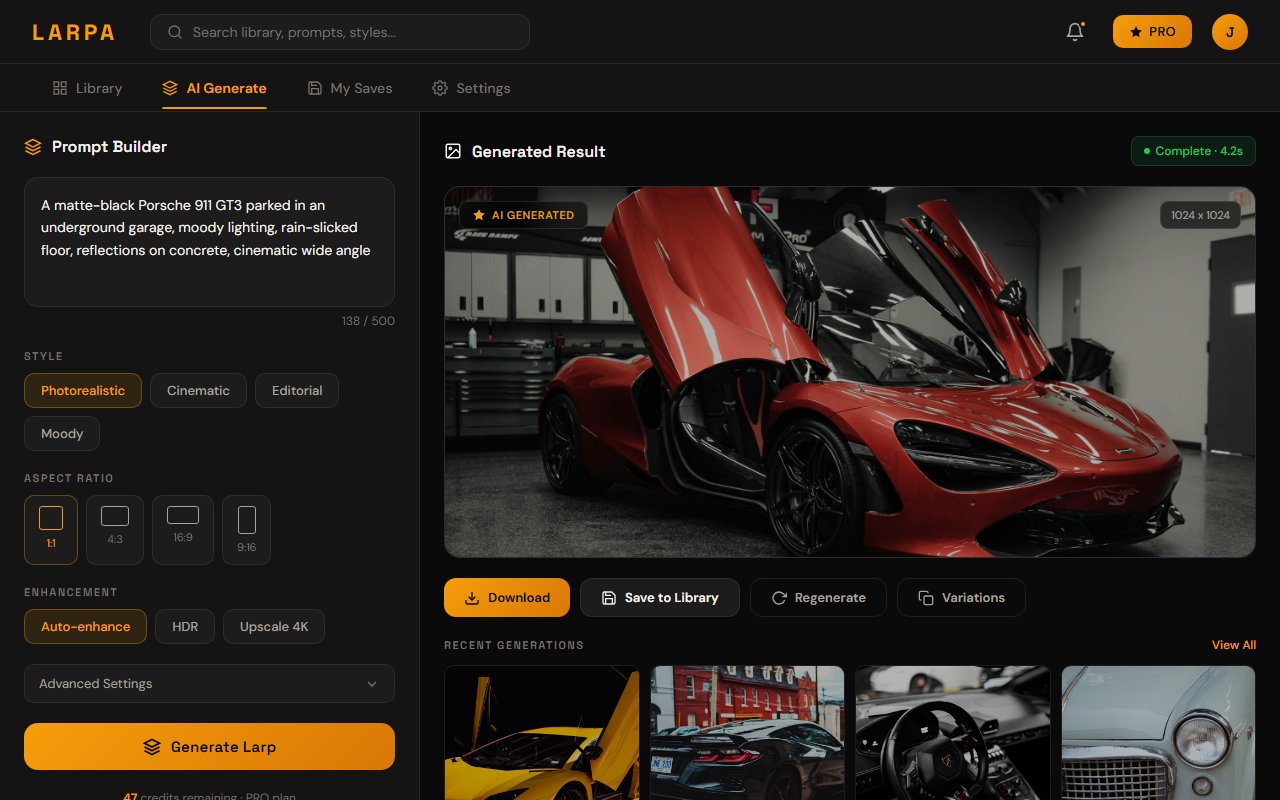
The next generation of AI tools is being built specifically for content creators. Instead of general-purpose image generation, these platforms understand what social media creators actually need:
- No prompt engineering — Describe what you want in plain language. The tool handles the technical optimization.
- Style consistency — Generate multiple images that look like they belong on the same feed.
- Category-aware — Built-in understanding of luxury content categories (cars, watches, travel, fashion).
- Social-ready output — Correct resolution, aspect ratio, and quality for Instagram, TikTok, and Twitter without post-processing.
Larpa is building exactly this. A platform where you describe what you want, get photorealistic results instantly, and post content that is genuinely yours. No prompt engineering required. Join the waitlist to try it.